I'm not aware of any official OpenAI dashboard that shows how often ChatGPT mentions your brand, so you track it by sampling. Write a fixed set of prompts your buyers would actually ask, run each one several times in a clean session, and record whether you are named, where you appear in the answer and which URL is cited. Repeat on a schedule and track the share of answers that mention you, alongside ChatGPT referral traffic in your analytics.
Ask ChatGPT the same buying question ten times and you won't get the same list of brands ten times. Answers change from run to run, so here is a way to measure your presence that survives the randomness, costs nothing to start and tells you what to fix.
Why one screenshot proves nothing#
ChatGPT writes each answer fresh, and the prompt wording, web search, memory, custom instructions and rough location can all change which brands appear. A single screenshot shows that you can appear, not how often you do, and because ChatGPT has no stable position like a Google ranking, I'd measure a rate instead: out of every ten times a buyer asks something like this, how many answers name you? Rates can be compared over time, and screenshots can't.
Where does ChatGPT's knowledge of you come from?#
There are two sources, and they need different fixes, so it helps to know which one a given answer came from.
The first is training data. When ChatGPT answers without searching, it draws on what the model learned during training, which reflects the web as it was some months earlier. If you launched recently or renamed a product, the model may simply not know.
The second is live search. When ChatGPT searches, it uses pages fetched by OpenAI's search crawler, OAI-SearchBot, and shows source links. This part reflects the web as it is now, which means it's the part you can influence fastest. If your robots.txt blocks OAI-SearchBot, your pages won't be surfaced as sources in those answers, however good they are. Our guide on allowing GPTBot and ChatGPT search in robots.txt has the exact lines.
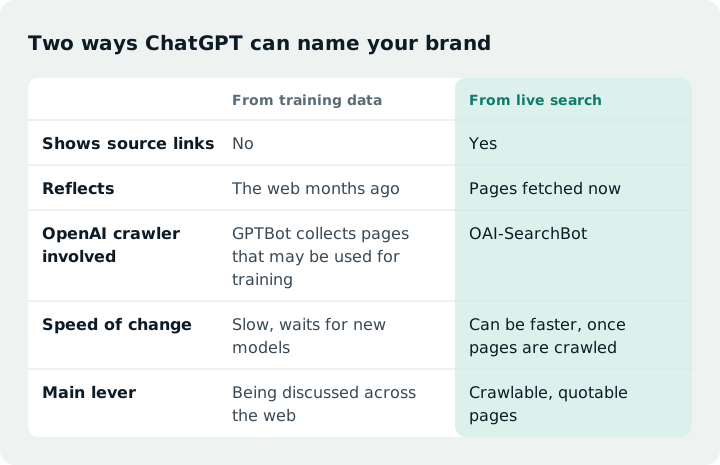
I'd track both, but label every result with whether the answer searched. It's easy to tell, because search answers show their sources.
Write prompts your buyers would type#
The prompt set is where most tracking goes wrong, and a common mistake is testing only your own name. Asking “What is Acme?” tells you whether ChatGPT knows you exist. It says nothing about whether you show up for someone who has never heard of you and is choosing a tool right now.
So split your prompts into three groups. Category prompts are what a buyer asks before they have a shortlist, such as “best invoicing software for freelancers in the UK”. Comparison prompts name you and a rival, such as “Acme vs Bolt for small agencies”. Problem prompts describe the pain without naming a category, such as “how do I stop chasing late client payments”. Problem prompts often teach you the most, because they show whether ChatGPT connects your product to the job it does.
Twenty to thirty prompts is a workable start. Take the wording from places buyers already speak: sales call notes, support tickets, your Search Console queries and Google's autocomplete. Then freeze the list. If you edit prompts every week, you can't tell whether a change came from ChatGPT or from you.
Run each prompt the same way, several times#
Consistency is what turns a pile of answers into a trend. This is the routine I'd follow:
- Turn off memory and custom instructions (or use a separate clean account), then open a temporary chat or a logged-out session so past conversations don't shape the answer.
- Paste the prompt exactly as written, with no extra context.
- Note whether the answer searched the web.
- Record the result, start a fresh chat and run it again. Three runs per prompt is a sensible minimum.
- Repeat the whole set on the same day each month, or each week during a push.
Your rough location still leaks in even with that setup, so treat your numbers as your view of ChatGPT, not everyone's. That's fine for spotting change over time, which is the point.
On cadence, I'd run the full set monthly to start and move to weekly only while you're actively changing pages. Answers vary from run to run, so weekly checks of a small sample mostly measure noise, whereas a monthly check with three runs per prompt gives you enough data to see a real shift and enough time for your changes to be crawled or noticed. Weekly earns its cost during a push, such as after a rewrite or a robots.txt fix.
What to write down#
A plain spreadsheet does the job. These are the columns I'd use:
date | prompt_id | prompt_group | run | searched_web | mentioned | position | cited_url | our_url_cited | competitors_named | description_verbatim
If you'd rather not build it yourself, download the tracking sheet template (CSV) and open it in Google Sheets or Excel. It has these columns and one example row to delete.
The last column matters more than it looks. If ChatGPT calls you “a budget option” and you aren't one, that's a positioning problem, and you can usually trace it back to the page it's paraphrasing.
To judge how ChatGPT describes you, I'd read the verbatim descriptions as a set rather than one at a time. I'd mark each as positive, neutral or negative, and separately as accurate or inaccurate, because a glowing answer built on an outdated feature is still a problem. Look for phrases that repeat, such as “budget option” or “best for small teams”, and for the competitors you're placed next to, since that framing is what a buyer takes away. One odd description is noise, but the same one across several runs points to a source you can fix.
The number to report is mention rate: answers that name you divided by total answers, split by prompt group. Track citation rate separately (answers that link to your site), because being named and being linked are different wins. I'd also count name mentions, URL citations and executive or product-name mentions separately, so a founder's name doesn't inflate your mention rate. If ChatGPT names your founder but never your company, that's a gap rather than a win, so it gets its own tag in the sheet. Share of voice against your top three competitors, from the same sheet, tells you whether you're gaining ground or the whole category just got noisier.
I'd only treat a change as real if it's around ten percentage points or more and holds across two or three checks in a row.
Do it by hand or pay for a tool?#
A growing set of products automate this, and I haven't run any of these, so what follows comes from each vendor's pricing page and not from testing. Here is who each is built for, going by its own pricing page. Profound is an enterprise AI visibility platform whose pricing page points larger teams toward talking to sales, so I'd consider it when several brands or regions need tracking and the budget matches. Peec AI is built around tracking a set of prompts across AI models, and as I understand it plans scale with the number of prompts and models, which suits a marketing team that already knows its prompt list. Otterly.AI offers self-serve plans for AI search monitoring, so it's where I'd look first if you've outgrown the spreadsheet but not your budget. Keyword.com sells AI visibility tracking alongside classic Google rank tracking, with credit-based pricing, which fits an SEO who wants both views in one login. Ahrefs offers Brand Radar for AI mentions, and it fits best if your team already works in Ahrefs. It also has a free AI Visibility Checker, which is a quick way to get a first reading. I haven't quoted prices because they change and vary by plan and billing, so check each pricing page before you decide. Whichever you pick, ask how it collects its answers, because that decides whether its numbers match what a person sees in ChatGPT.
Here's how the two approaches compare.
| Manual spreadsheet | Monitoring tool | |
|---|---|---|
| Cost | Your time | Paid subscription, check each vendor's pricing page |
| Prompts you can cover | 20 to 50 | Hundreds |
| Runs per prompt | A few, by hand | Many, on a schedule |
| Matches what users see | Close, you use the real app | Varies by tool, so ask each vendor how it collects answers |
| Best for | Learning what buyers see | Ongoing tracking at scale |
I'd start by hand for a month either way. You learn which prompts matter and what the answers look like, which makes you a much sharper buyer if you pay for a tool later.
Surfacepath's free check only tests crawler access and readability, which is the part you can fix directly and what search answers depend on. Surfacepath doesn't track mentions today. A paid Pro plan that does is on a waitlist at /pricing.
Check the traffic side too#
Mentions are the leading signal. Visits are the one people will ask you about. ChatGPT adds utm_source=chatgpt.com to many of the links it cites, and the referrer shows as chatgpt.com, so in GA4 you can filter sessions by source and see which pages people land on. The tag isn't on every link, though, so some ChatGPT visits show up as Direct or Referral. I'd set up a GA4 custom channel group that matches chatgpt.com, and treat the session count as a floor, not a total.
Not every mention produces a click, so expect traffic to be much smaller than your mention rate suggests. One useful habit: if a page gets ChatGPT visits but never appears in your prompt sheet, add the question that page answers to your prompt set. Your buyers just told you what they're asking.
What to do when you're not mentioned#
An empty column still tells you where to work. If search answers cite competitors and never you, open the cited pages and compare them with yours. Check whether they answer the question in the first lines, in plain text, on a page a crawler can load without running JavaScript. Our guide to writing pages AI assistants can quote walks through that shape, and if your site renders content in the browser, read whether AI crawlers can see JavaScript content before you rewrite anything.
If answers without search leave you out, the fix is slower. The model learns from what the wider web says about you, so reviews, comparison articles and community threads matter more than anything on your own site. Re-run your set after each change and give it a few weeks before you judge it.
Questions
How do you track brand mentions in ChatGPT?
Build a fixed set of 20 to 30 prompts your buyers would ask, run each several times in a temporary chat and log if you're named, where you appear and which URL is cited. Repeat monthly (weekly during a push) and track your mention rate over time.
Why do my numbers differ from my colleague's?
Because the answer depends on more than the prompt. Memory, custom instructions, rough location, whether web search ran and the exact wording all change which brands appear, and each answer is generated fresh. Agree on one setup (temporary chat, memory and custom instructions off), freeze the prompt list, run each prompt several times and compare mention rates rather than single answers.
How do you track media mentions?
For news and blogs, alert services and media monitoring tools watch for your name and send new matches. AI answers need prompt-based sampling instead, because they aren't published pages an alert can find.
Can you track brand mentions in ChatGPT for free?
Yes. Ask ChatGPT category and brand prompts in a logged-out or temporary session, with web search on and off, repeat each several times and log the results in a spreadsheet. Ahrefs describes the same manual method and treats it as a baseline, since it doesn't scale. Ahrefs also offers a free AI Visibility Checker for a quick first reading.